
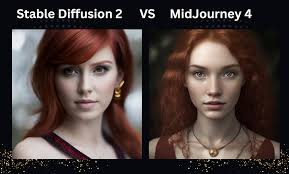
Midjourney is known for its artistic and often dreamlike images, making it user-friendly with Discord. Stable Diffusion offers more control and customization, often requiring more technical setup but providing greater flexibility for advanced users. The best choice depends on your need for ease of use versus detailed control.
Midjourney vs Stable Diffusion: The Big Picture
Let’s dive into what makes these two AI art tools tick. Think of them like different kinds of cameras. One might be point-and-shoot.
The other might be a pro-level DSLR. Both take photos. But the way you use them, and the results you get, are quite different.
Midjourney aims for beauty and ease. Stable Diffusion aims for power and freedom. Understanding this core difference is key.
Midjourney lives inside Discord. This might sound odd. But it’s part of its charm.
You chat with a bot. You type in what you want. The bot makes art.
It’s very simple to get started. This makes it great for beginners. Or for people who just want to make nice pictures fast.
It has a very distinct artistic style. Many people love this style. It often looks like concept art.
Or like something from a fantasy novel.
Stable Diffusion is more of an open system. You can run it on your own computer. Or use it through various websites and apps.
This gives you a lot more control. You can tweak settings. You can use different models.
You can even train it on your own images. This is powerful. But it can also be a bit more complex.
It’s like having a blank canvas. You can paint anything. But you need to know how to paint.
How They Work (Simply Put)
Both Midjourney and Stable Diffusion use something called diffusion models. Don’t worry about the fancy name. The basic idea is pretty cool.
Imagine a clear image. Then, imagine adding a little bit of noise to it. Then, more noise.
Keep adding noise until the image is just static. A diffusion model learns to reverse this. It starts with pure noise.
It then gradually removes the noise. It does this based on a text description you give it. This process creates a new image.
The magic happens in how they learn. They are trained on billions of images and their descriptions. So, they learn what “a cat sitting on a mat” looks like.
They learn what “a futuristic city at sunset” looks like. When you give them a text prompt, they use this knowledge to guide the noise-removal process. They try to create an image that matches your words.
Midjourney’s Approach
Midjourney’s team has focused on making the output look good. They have fine-tuned their models. This means their AI has a specific artistic ‘taste’.
It’s trained to produce visually pleasing results. Often, these results are detailed and have a painterly feel. The interface, being in Discord, simplifies the process.
You send a prompt. Midjourney gives you a few options. You can then ask for more variations.
Or you can make one of the options larger and more detailed.
It’s a bit like working with a very talented artist. You give them a brief. They come back with something beautiful.
You might not have total control over every brush stroke. But the final piece is usually impressive. This is great for people who want to focus on ideas and concepts.
They don’t need to worry about the technical details. The artistic direction is largely handled by Midjourney itself.
Stable Diffusion’s Approach
Stable Diffusion is different. It’s more like a powerful engine. You can attach different tools to it.
There are many different versions (called models or checkpoints) of Stable Diffusion. Some are trained for realism. Others are for anime.
Some are for a specific art style. This means you can pick the best model for your task. You also have sliders and settings.
You can adjust how much ‘creativity’ the AI has. You can tell it what to avoid. You can even influence the image with other images.
This level of control is amazing for artists. They can fine-tune the output. They can create very specific looks.
However, it means there’s a learning curve. You need to understand what the different settings do. You might spend time trying different models.
You might experiment with prompts to get exactly what you want. It’s less about giving a brief and more about directing the creation process yourself.
Quick Contrast: User Experience
Midjourney
Easy to start.
Uses Discord chat.
Focuses on aesthetic results.
Less technical control.
Stable Diffusion
More setup needed.
Can run locally or via apps.
Focuses on user control.
High technical flexibility.
Key Strengths and Weaknesses
Every tool has its good points and its not-so-good points. It’s important to know these. This helps you pick the right one for your project.
Or for your mood at that moment.
Midjourney Strengths
One of the biggest strengths is its ease of use. You can go from zero to making art in minutes. You don’t need a powerful computer.
You don’t need to install complex software. Just a Discord account and an internet connection.
The artistic quality is another major plus. Midjourney consistently produces beautiful images. They often have a unique, almost magical look.
This makes it perfect for concept art, illustrations, or just creating stunning visuals without a lot of effort. Many users find its default style very appealing. It has a strong aesthetic.
This means less prompt engineering might be needed to get a good result.
The community aspect is also a benefit. Because it’s in Discord, you can see what others are creating. You can learn from their prompts.
There’s a shared space for inspiration. This can be very motivating. It feels like a creative hub.
Finally, Midjourney is great for rapid ideation. If you have an idea and want to see it visualized quickly, Midjourney is fantastic. You can generate many variations.
You can quickly explore different visual styles for a concept. This speeds up the creative process.
Midjourney Weaknesses
The main weakness is the lack of fine-grained control. You can’t easily change specific elements of the image. You can’t say “move that tree a little to the left”.
You have to re-prompt or ask for variations. This can be frustrating if you have a very specific vision.
The artistic style, while a strength, can also be a weakness. If you don’t like Midjourney’s default style, it can be hard to get away from it. While it has improved, it can sometimes look a bit too “Midjourney”.
Achieving perfect photorealism or a very specific, non-standard artistic look can be challenging.
It’s also not free. After a very limited free trial, you need a subscription to use it. This is a barrier for some users.
You are also reliant on Discord. If Discord has issues, you can’t use Midjourney. And you don’t own the software.
You are using their service.
Midjourney: The Quick Look
- Pros: Easy to use, stunning artistic output, great for beginners, rapid idea generation, active community.
- Cons: Limited control, specific artistic style can be limiting, requires subscription, dependent on Discord.
Stable Diffusion Strengths
The biggest strength of Stable Diffusion is its flexibility and control. You can adjust almost everything. This is ideal for professionals.
Or for hobbyists who love to tinker. You can specify aspect ratios. You can use negative prompts to tell it what NOT to include.
You can generate images at very high resolutions.
It’s also very versatile. With different models and tools (like ControlNet), you can guide the image generation in incredibly precise ways. Want to keep the exact pose of a person from a reference photo?
Stable Diffusion can do that. Want to generate an image that matches a specific color palette? It’s possible.
The open-source nature is a huge advantage. Many people can use it for free. You can download and run it on your own hardware.
This means you have privacy. You are not beholden to a company’s terms of service. It also means there’s a huge community developing new tools and models.
For photorealism, Stable Diffusion often excels. With the right models and prompts, you can create images that are incredibly lifelike. This is harder to achieve consistently with Midjourney.
It’s also great for specific styles. If you want a retro comic book look, or a sci-fi concept piece, you can find or train models for it.
Stable Diffusion Weaknesses
The learning curve is steep. For beginners, it can be overwhelming. You need to understand different interfaces, models, and parameters.
Running it locally requires a good graphics card (GPU). Setting it up can be a technical challenge.
While it can be free, good results often require powerful hardware. If you don’t have a good GPU, you’ll need to use online services. These often have costs associated with them, or limitations.
The default output can sometimes be less artistically refined than Midjourney. Without careful prompting and settings, the images might look a bit “plain” or “generic”. You have to work harder to get that wow factor.
It requires more prompt crafting and knowledge of the system.
Consistency can also be an issue. Getting the exact same style or character across multiple images can be tricky. You need to use techniques like seeds or specific model settings.
This adds another layer of complexity. While it offers control, that control demands understanding.
Stable Diffusion: The Quick Look
- Pros: High control, extreme flexibility, versatile styles, open-source (often free), good for photorealism, community innovation.
- Cons: Steep learning curve, requires powerful hardware or paid services, can lack default artistic polish, consistency can be difficult.
Who Is Each Tool Best For?
Thinking about who uses these tools helps make the choice clearer. Each one shines in different situations and for different people.
Midjourney: The Artist’s Sketchpad or Concept Generator
Midjourney is fantastic for:
- Beginners in AI art: If you’re new to this and want to see amazing results quickly without a technical headache.
- Illustrators and concept artists: For generating ideas, moods, and visual styles for projects. It’s a powerful brainstorming partner.
- Content creators: If you need striking visuals for social media, blogs, or presentations, and want them fast.
- Hobbyists who want beautiful results: People who enjoy creating art but don’t want to get bogged down in technical details.
- Explorers of imagination: If you have vivid ideas and want to see them brought to life in a visually rich way.
I remember trying Midjourney for the first time. I was frustrated with a character design I was sketching. I typed in a quick description.
Within minutes, I had five different interpretations. Some weren’t quite right, but one sparked a whole new direction. It was like a creative shortcut that didn’t feel like cheating.
It felt like getting a fresh perspective.
Stable Diffusion: The Digital Artisan’s Studio
Stable Diffusion is ideal for:
- Digital artists and designers: Who need precise control over every aspect of the image.
- Photographers and image editors: Wanting to enhance or create photorealistic elements.
- Developers and tinkerers: Who enjoy experimenting with AI models and building custom workflows.
- People needing specific styles: If you have a very particular artistic vision that Midjourney’s default style might not match.
- Users who value privacy and local control: Running models on your own machine offers more security.
I worked with a graphic designer once who was making a website. They needed a very specific abstract background. Nothing they could find online worked.
They decided to try Stable Diffusion. They spent hours tweaking prompts, using different models, and learning about inpainting. But in the end, they created an image that was exactly what they envisioned.
It was custom, unique, and perfectly fit the brand. That kind of power is what Stable Diffusion offers.
Who Wins? It Depends!
Choose Midjourney If:
You want easy, beautiful art.
You’re new to AI art.
You like artistic, illustrative styles.
You want quick results.
Choose Stable Diffusion If:
You want maximum control.
You’re technically inclined.
You need photorealism or very specific styles.
You want to tinker and customize.
Real-World Context and Use Cases
Let’s look at how people actually use these tools in their daily lives or work. It’s not just about making pretty pictures. It’s about solving problems and creating things.
Midjourney in Action
Imagine a writer working on a fantasy novel. They need to visualize their main character. They can describe the character to Midjourney.
They get several versions. One version has the perfect hair. Another has the right clothing.
The writer can then mix and match elements from different results. They can refine the prompt. This helps them get a clear mental image.
This image then fuels their writing. It makes the world feel more real to them.
Another example: a small business owner. They need a unique graphic for their social media ad. They don’t have a design budget.
They can use Midjourney. They type “cozy coffee shop interior with people reading books and steaming mugs, warm lighting, soft focus, digital painting”. Midjourney delivers.
The business owner gets a great image. It fits their brand. It looks professional.
All without hiring a designer.
In game development, Midjourney is used for concept art. Artists can quickly generate dozens of ideas for creatures, environments, or weapons. This speeds up the early stages of design.
It helps the team decide on a visual direction faster. It’s like having an army of junior concept artists at your fingertips.
Stable Diffusion in Action
A photographer discovers a flaw in a photo they took. Maybe a small object in the background they want gone. Or they want to add a specific texture to a wall.
Using Stable Diffusion with tools like inpainting, they can precisely edit the photo. They can “paint over” the area they want to change. Then, tell the AI what to put there.
It’s like having super-powered Photoshop tools.
A fashion designer wants to visualize a new clothing line. They can use Stable Diffusion to create realistic mockups. They can show garments on models.
They can experiment with different fabrics and colors. They can even generate variations of the same design. This helps them present their ideas to clients or investors.
It also helps them refine their designs before making actual samples.
Web designers can use it to create custom textures or backgrounds. Instead of using generic stock images, they can generate something unique. This makes websites stand out.
They can ensure the design elements perfectly match the brand’s aesthetic. They might use it to create seamless patterns for backgrounds. Or to generate icons in a specific style.
Use Case Snapshot
Midjourney Use Cases:
Brainstorming visuals for stories or games.
Creating eye-catching social media graphics.
Generating quick illustrations for articles.
Exploring moods and atmospheres for creative projects.
Stable Diffusion Use Cases:
Advanced photo editing and manipulation.
Creating custom textures and patterns for design.
Generating specific styles for animation or art.
Developing realistic product mockups.
What This Means for You
So, after all this, what’s the takeaway? It’s not about one being “better” than the other. It’s about which one is better for you and what you want to do.
If you just want to make cool pictures and explore your imagination without a lot of fuss, Midjourney is likely your friend. You can get amazing results. You can see your ideas come to life.
It’s an accessible doorway into the world of AI art generation. You don’t need to be a tech wizard. Just a curious mind.
If you’re an artist, designer, or someone who likes to have deep control over their creations, Stable Diffusion is probably the path to go down. The power it offers is immense. You can sculpt images.
You can achieve looks that are impossible with other tools. But it does ask for your time and effort to learn its ways. It’s a powerful tool for those who want to master it.
Think about your goals. Are you looking for quick, beautiful results? Or are you looking for ultimate creative freedom and control?
Your answer will point you to the right tool. Most people find they might even use both. Maybe Midjourney for initial ideas.
And Stable Diffusion for fine-tuning or specific projects.
Quick Tips for Getting Started
No matter which tool you choose, a few tips can help you on your journey.
For Midjourney Users:
- Be descriptive: The more detail you give, the better the results. Think about style, mood, colors, lighting, and composition.
- Experiment with aspect ratios: Use `–ar 16:9` for wide images or `–ar 9:16` for tall ones.
- Use image prompts: You can upload an image and have Midjourney use it as inspiration.
- Learn from others: Look at the prompts people are using in the Discord channels.
For Stable Diffusion Users:
- Start with user-friendly interfaces: Apps like AUTOMATIC1111 or ComfyUI make it easier than using code.
- Find good models: Websites like Civitai host many custom models for different styles.
- Master negative prompts: Tell the AI what you don’t want. This is crucial for good results.
- Explore ControlNet: This is a powerful add-on that lets you control poses, depth, and edges of your generated images.
Tips for Both:
- Understand prompts: Learning how to write effective prompts is key for both.
- Iterate: Don’t expect perfection on the first try. Refine your prompts and settings.
- Have fun!: This is a creative tool. Enjoy the process of discovery.
Frequently Asked Questions
Is Midjourney better than Stable Diffusion for beginners?
Yes, Midjourney is generally easier for beginners. Its interface is simpler, and it often produces beautiful results with less technical knowledge required. Stable Diffusion has a steeper learning curve but offers more control once mastered.
Can I use Stable Diffusion for free?
You can use Stable Diffusion for free if you have a powerful enough computer to run it locally. There are also many free online services and platforms that offer access to Stable Diffusion, though some may have limitations.
Does Midjourney cost money?
Yes, Midjourney is a subscription service. After a limited free trial, you need to pay a monthly fee to generate images.
Which AI art generator is best for photorealism?
Stable Diffusion is often considered better for photorealism, especially with specific models trained for realistic output. While Midjourney can produce realistic styles, Stable Diffusion offers more precise control for achieving hyperrealism.
Can I sell the art I create with Midjourney or Stable Diffusion?
The terms of service for both platforms often allow you to sell your creations. However, it’s always best to check the latest terms of service for any restrictions or requirements, especially regarding commercial use and ownership.
What is a “prompt” in AI art generation?
A prompt is the text description you give to the AI. It tells the AI what kind of image you want it to create. Good prompts are detailed and descriptive, guiding the AI’s output.
Final Thoughts
Deciding between Midjourney and Stable Diffusion is an exciting step. It’s like picking your favorite paintbrush. Both can create masterpieces.
But they do it in their own way. Midjourney offers a magical shortcut to beauty. Stable Diffusion offers a vast workshop for the dedicated artist.
Your creative journey will guide you. Explore both if you can. Find the one that sparks your imagination the most.
Happy creating!
